THE PRACTICAL GUIDE / SOURCE PREVIEW
From GitHub
to your Linux host.
Build SysWarden v4.10.0.
Understand every step. Keep a way back.
01
First, know exactly what you are building.
There is a satisfying moment when a project stops being a repository in a browser and starts doing useful work on a machine you control. This guide is about getting there with SysWarden, while keeping enough visibility to explain every step. We will build native packages, install one on a disposable Linux host, check what actually started, and learn how to operate it without turning recovery into an improvisation exercise.
The route is deliberately practical. You do not need to become a packaging specialist before your first build. You do need a clean checkout, the right tools, a spare target and a way back. A security tool deserves the same care as the system it is supposed to protect.
A local build, a green CI run and a qualified release answer different questions. A build tells you that these sources can produce these artifacts. CI exercises its defined checks. Qualification binds native behavior and restoration evidence to an exact candidate. I want all three to be useful, and I will not quietly substitute one for another.
Source: Candidate README, pinned to 24c3c6e1.
02
Understand the flow before touching the firewall.
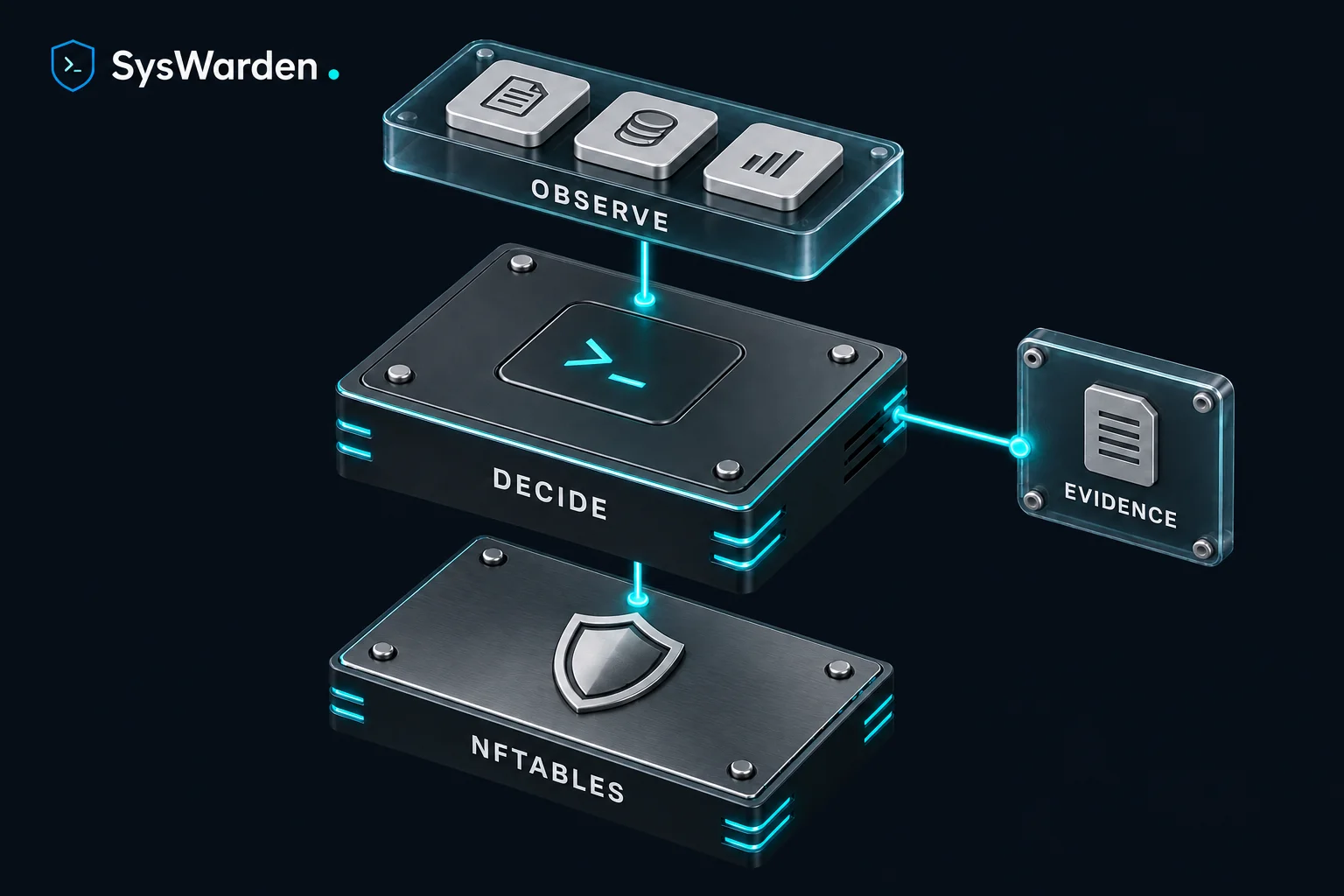
SysWarden is a Linux host security orchestrator. It observes host signals and supported security logs, evaluates policy and applies validated decisions through nftables. The CLI handles operator workflows; the core provides detection and runtime coordination; the TUI gives you a local terminal view of the system.
 SysWarden.THE HOST DEFENSE PATH
- 01ObserveHost telemetry and trusted logs
- 02DecideValidated policy and ownership
- 03EnforceAuthoritative nftables state
- 04ReviewAlerts and runtime history
Out-of-band WAAP analysis does not place another reverse proxy in front of your application. It consumes logs from supported upstream services. BunkerWeb can remain the in-band web protection layer, with a separately configured authenticated integration. That division makes the responsibilities easier to reason about.
The dashboard is local. syswarden tui does not require a public web console or an extra dashboard listening port. Optional HA is a different feature with its own authenticated network boundary. Keep those two ideas separate when writing your firewall policy.
Source: CLI command contract, pinned to 24c3c6e1.
03
Give the build and the target separate jobs.
Use two roles: an ordinary-user build environment, and a disposable installation target with working console access. Separate VMs are convenient. The important point is that building a package is not the same operation as installing it on your everyday workstation or production server.
| Role | Choose this | Why it matters |
|---|---|---|
| Build machine | Linux x86_64, Debian/Ubuntu or a RHEL/Fedora family distribution | The builder explicitly checks the host family. Ubuntu 24.04 is the package workflow reference. |
| Installation target | A representative amd64 / x86_64 Linux test host | Select the native package and service manager that match the target. |
| Alpine | Installation target using OpenRC | The builder produces an APK, but does not accept Alpine as its build host. |
| Resources | Several GB free, including /tmp, and enough RAM for Go compilation | The builder uses private temporary caches. Runtime and peak memory depend on the machine. |
This guide does not cover ARM, macOS or Windows deployment. A package filename is not a promise that every distribution derivative has completed native qualification. Use the exact platform and package profile relevant to your deployment plan.
The build fetches locked Go modules and packaging dependencies. It is not an offline recipe. Use your approved repositories and network paths. Installation can configure services, SSH, firewall policy, hardening and scheduled jobs; an apparently routine package transaction can change real host behavior.
Source: Builder preflight and package workflow, pinned to 24c3c6e1.
04
Install the tools, then respect the pins.
Start with distribution packages. Run only the block matching the build machine. These commands prepare the compiler and packaging environment; they do not install SysWarden.
sudo apt-get update
sudo apt-get install -y \
  bash git python3 ca-certificates curl ruby ruby-dev build-essential \
  binutils file rpm rpm2cpio cpio tar gzip xz-utils zip unzip \
coreutils findutils diffutils grep sed gawk util-linuxsudo dnf install -y \
bash git python3 ca-certificates curl ruby ruby-devel rubygems gcc make \
binutils file rpm rpm-build cpio tar gzip xz zip unzip \
coreutils findutils diffutils grep sed gawk util-linuxThis candidate pins Go 1.26.6 for linux/amd64, FPM 1.17.0 and nFPM 2.47.0. Newer does not mean interchangeable here. The builder checks these versions and refuses an implicit download of a missing Go toolchain.
Install go1.26.6.linux-amd64.tar.gz from the official Go downloads, verify its SHA-256 against the official listing, and follow the Go installation instructions. Extract into a fresh location, not over an existing installation. Put that installation’s bin directory first in your shell’s PATH. Then confirm the exact compiler:
GOTOOLCHAIN=local go versionExpected: go version go1.26.6 linux/amd64. Keep the remaining tools under your user account, outside the source checkout. The following block installs the pinned packaging tools and checks their identities. Keep this shell open for the build:
set -euo pipefail
SW_BUILD_TOOLS="${HOME}/.local/share/syswarden-build-tools"
mkdir -p "${SW_BUILD_TOOLS}/bin" "${SW_BUILD_TOOLS}/gems"
export GEM_HOME="${SW_BUILD_TOOLS}/gems"
export GEM_PATH="${GEM_HOME}"
export PATH="${SW_BUILD_TOOLS}/bin:${GEM_HOME}/bin:${PATH}"
gem install --no-document fpm -v 1.17.0
GOTOOLCHAIN=local GOWORK=off GOFLAGS='' GOENV=off \
  GOBIN="${SW_BUILD_TOOLS}/bin" \
  go install github.com/goreleaser/nfpm/v2/cmd/nfpm@v2.47.0
fpm --version
go version -m "$(command -v nfpm)"
FPM must print 1.17.0. nFPM’s Go metadata must contain github.com/goreleaser/nfpm/v2 at v2.47.0. Its executable must be a regular file, not a symlink. If a dependency is unavailable, resolve it through your approved tooling process instead of removing the builder’s check.
Source: Exact toolchain checks, pinned to 24c3c6e1.
05
Fetch the source. Freeze the revision.
Start in a parent directory of your choice with a fresh clone. Keep notes, build logs and downloaded tooling outside it. Preserve existing work; there is no reason to throw away another checkout’s changes to make this procedure pass.
git clone https://github.com/duggytuxy/syswarden.git syswarden-source-build
cd syswarden-source-build
git fetch origin main
SW_SOURCE_SHA=24c3c6e1548b8db0ccf64c37a33e05b351be5a18
git switch --detach "${SW_SOURCE_SHA}"
test "$(git rev-parse HEAD)" = "${SW_SOURCE_SHA}"
git status --short
./scripts/versioning.sh inspect --repo .
The status output should be empty and the version inspector should report v4.10.0. Stop if either differs. The full commit makes this guide reproducible even after main moves. It identifies source content; it does not by itself establish maintainer authenticity or release qualification.
A source ZIP cannot replace this clone. The builder needs Git metadata, records the repository state and materializes the exact commit into its private build workspace. It also rejects inherited Git environment variables that could redirect what it reads.
When you intentionally evaluate a later revision, record that new full SHA and review its own builder, configuration schema and documentation. Do not edit the changelog or version declarations merely to obtain a familiar package filename.
Source: Version inspector, pinned to 24c3c6e1.
06
Build the packages without installing the product.
From the clean repository root, run the builder as the same ordinary user. Do not use sudo. Keep pipefail: a pleasant-looking tee transcript should never hide a failed build.
set -euo pipefail
SW_SOURCE_VERSION="$(./scripts/versioning.sh inspect --repo .)"
SW_PACKAGE_VERSION="${SW_SOURCE_VERSION#v}"
SW_BUILD_LOG="$(mktemp "${TMPDIR:-/tmp}/syswarden-build-log.XXXXXXXX")"
bash ./build_packages.sh 2>&1 | tee "${SW_BUILD_LOG}"
git status --short
printf 'Source: %s\nVersion: %s\nLog: %s\n' \
  "${SW_SOURCE_SHA}" "${SW_SOURCE_VERSION}" "${SW_BUILD_LOG}"
Continue only after a zero exit status, the final success message and an unchanged clean checkout. The builder compiles the CLI, core and TUI, checks provenance and packaging contracts, and publishes the artifacts in dist/packages. Its Go build targets Linux AMD64 level v1 with CGO_ENABLED=0; the APK path has separate static binaries.
SysWarden.FROM CHECKOUT TO HOST- 01Pinned sourceFull SHA and clean Git state
- 02Private buildExact tools and locked modules
- 03Local packagesDEB, RPM, APK and SHA-256
- 04Test hostOne matching package
| Installation family | Default artifact |
|---|---|
| Debian / Ubuntu | syswarden_4.10.0_amd64.deb |
| RHEL / Fedora | syswarden-4.10.0-1.x86_64.rpm |
| Alpine / OpenRC | syswarden_4.10.0_x86_64.apk |
The default build produces all three packages even if you need only one. dist and dist/packages must be real directories owned by your build user and group; the builder protects them with mode 0700. Keep that boundary intact.
Source: Native package builder, pinned to 24c3c6e1.
07
Check the bytes and keep the provenance.
(
  cd dist/packages
  sha256sum --check --strict SHA256SUMS.txt
)
git rev-parse HEAD
Every listed package must pass. Retain the full source SHA, tool versions, build log, packages and checksum manifest together outside the checkout before running another build. Two different commits can both identify themselves as v4.10.0 and produce identically named files. A version string is too coarse to identify your actual test artifact.
Transfer the selected package through an authenticated channel, such as SSH with a verified host key. Keep its expected hash independently on the build machine and check it again on the destination. If you transfer one package, verify that exact filename and digest. Do not treat absent files in a broader manifest as completed checks.
For an official release, follow the separate package-authentication procedure and its independently trusted signing keys. A key placed beside an untrusted package does not authenticate either file. An SBOM is a useful dependency inventory, not a statement that a package is free of vulnerabilities.
Source: Package authentication and diagnostics, pinned to 24c3c6e1.
08
Prepare the target before the first transaction.
Now move to your disposable installation target. Confirm its distribution and architecture, record its existing services and firewall state, and verify a console plus a second operator SSH session. Take a complete pre-installation VM or volume snapshot and make sure the recovery path is usable.
cat /etc/os-release
uname -m
sudo nft list ruleset
sudo ss -lntup
The target should report x86_64. If an inspection tool is not installed, record that fact and use the distribution’s appropriate read-only inventory. Keep the existing firewall frontend and its service state intact while taking this inventory.
On an existing installation, retain configuration, lists, package identity, firewall state and required trust material as private recovery data. Check operator reachability at both the cloud or provider firewall and the host boundary. A rule on one layer does not guarantee that the other will permit a new SSH session.
Review package hooks and your intended SSH, firewall, hardening, feed and integration settings before installing. The standard package’s activation can run during its transaction. Waiting until the transaction finishes to think about policy is too late.
The default keep backend preserves firewall service ownership, but it can still publish nftables policy and reconcile bounded rules for one already active supported UFW or firewalld frontend. It does not mean “leave every rule unchanged”. Do not stop an existing frontend simply to make an ambiguous deployment pass.
Source: Package activation paths, pinned to 24c3c6e1.
09
Install one matching standard package.
Use only the block for your target, from the directory containing the independently checked package. The APT and DNF examples omit automatic confirmation flags. Alpine is non-interactive by default, so its commands explicitly request --interactive. Run these steps in an interactive terminal, review the proposed transaction before confirming, and use approved distribution repositories for runtime dependencies.
sudo apt-get update
sudo apt-get install ./syswarden_4.10.0_amd64.deb
sudo dpkg --audit
dpkg-query -W syswarden
A successful DEB path requires completed configuration. Stop on half-configured packages or an activation error; preserving the transaction output makes the next diagnostic step much easier.
sudo dnf install ./syswarden-4.10.0-1.x86_64.rpm
rpm -q syswarden
A locally built RPM is not signed with the official release identity. If your policy refuses it, use an accepted organizational signing process or the qualified official release route. Do not globally disable signature checking to silence that refusal.
For the Alpine 3.24 / OpenRC candidate baseline, first install all 15 declared runtime dependencies with normal package-signature verification. The list below comes from this exact revision’s APK metadata. Keep the configured repositories and trusted keys under your approved distribution policy.
sudo apk --interactive --no-cache add \
  nftables openrc cronie cronie-openrc curl wget rsyslog rsyslog-uxsock \
  bash-completion wireguard-tools libqrencode-tools jq procps-ng \
  e2fsprogs-extra shadow
sudo apk --interactive --allow-untrusted add ./syswarden_4.10.0_x86_64.apk
apk info -v syswarden
--allow-untrusted is a global APK option: it permits unsigned or untrusted packages throughout that transaction, including any dependencies, not just the named local file. Independently hash-check your locally built candidate first. Complete the authenticated dependency installation before this second command, inspect its proposed changes, and decline if it would install or replace any additional package. Resolve such dependencies separately with normal signature verification. The flag does not authenticate the publisher; use an accepted package-signing route when your policy requires signature enforcement throughout. See the APK 3.0 global-option reference.
Alpine activation depends on the exact Cronie and OpenRC state. Installing those dependencies alone does not prove that state. If the package reports a payload-only installation, preserve its output and follow the emitted fail-fast, two-phase activation procedure after the transaction completes. Do not replace it with a bare syswarden install or a few guessed scheduler commands. An installed APK payload and an active security service are different facts.
Offline systemd image transactions can also defer activation. Follow the package’s emitted instructions after the real target boots. When a package stops and explains a missing prerequisite, that is the point to inspect it, not to improvise around it.
Source: Standard package hooks, pinned to 24c3c6e1.
10
The alternate RPM has a different contract.
For RHEL-family 9 or newer image workflows, the candidate also contains an explicitly selected package-owned runtime profile. It is an alternative integration model, not an extra package to layer on top of the standard RPM.
bash ./build_packages.sh --rhel-package-owned-profileThe RPM output becomes syswarden-4.10.0-1.rhelpo.x86_64.rpm. DEB and APK retain their standard paths. The two RPM variants share the package name syswarden and cannot coexist. Archive the standard build before producing the alternate set.
The package-owned variant owns its units, preset and protected directories. Its installation scriptlets do not invoke the SysWarden binary, mutate the host firewall or start the services during the transaction. Dynamic enforcement still happens when the services run. The image owner supplies approved configuration and proves correct first-boot behavior.
Removal is also different: syswarden uninstall must complete the runtime cleanup and establish the exact erase-ready boundary before native RPM removal. The standard installation steps above are not a substitute for the profile’s own procedure. This variant is never selected by syswarden update.
If you are building ordinary host packages for your first lab, keep the default route. If you need this profile, read its complete pinned contract, including image preparation, verification and removal, before changing the target. Do not combine it with the separate first RHEL image extension in one image.
Source: RHEL package-owned profile, pinned to 24c3c6e1.
11
Prove that the installation is alive.
After the supported activation path completes on the real target, start with version, configuration and operational diagnostics. On RHEL-family systems, sudo may omit /usr/local/bin from its search path. If sudo syswarden reports “command not found”, check the package-owned launcher by its absolute path:
sudo /usr/local/bin/syswarden --helpUse sudo /usr/local/bin/syswarden in place of sudo syswarden for the administrative commands below when this fallback is needed. Do not change the global sudo search path or create an unmanaged binary link to work around it. Then run:
sudo syswarden
sudo syswarden config validate --path /etc/syswarden/config
sudo syswarden audit
The first command prints the CLI version. The version display uses the command with no subcommand; this candidate does not expose a --version flag. Configuration validation is read-only. Read its unknown-key and deprecated-key output as well as the exit status. The audit is an operational diagnostic, not a compliance certificate or a release qualification verdict.
sudo systemctl status syswarden-core.service syswarden-firewall.service --no-pager
sudo journalctl -u syswarden-core.service -u syswarden-firewall.service -n 80 --no-pagersudo rc-service syswarden-core status
sudo rc-service syswarden-firewall statusA one-shot firewall service does not have to look like a long-running daemon. Read its result, the corresponding journal and the actual kernel state together. Check that a fresh operator SSH session still works and that the intended application remains reachable.
For binary provenance, use go version -m on retained copies of the installed binaries under /opt/syswarden/bin, using your build machine if the target has no Go toolchain. The recorded vcs.revision should match the full candidate SHA and vcs.modified should be false. Keep the package version, source revision and observed runtime state in the same notes.
Source: Version-aware operator guidance, pinned to 24c3c6e1.
12
Make one policy change at a time.
Once the baseline is healthy, use the modular editor and the installed schema. Start with a clear service inventory: who administers this host, which clients need access, which logs are authoritative, and which external integrations are actually required? Configuration is much easier when those answers exist before the first toggle.
sudo syswarden config| Module | Responsibility |
|---|---|
config.toml | Master configuration and module directory |
00-core.toml | Core behavior and backend settings |
10-network.toml | Network policy and threat-intelligence inputs |
20-security.toml | Security and hardening settings |
30-waap.toml | WAAP engine and supported log inputs |
40-integrations.toml | Integrations, HA and BunkerWeb |
99-user.toml | Custom user overrides |
The editor saves configuration; it does not automatically prove that your intended runtime behavior is active. Review the change, validate it and only then apply it to an already activated installation:
# Review the intended change before running this block.
sudo syswarden config validate --path /etc/syswarden/config &&
  sudo syswarden reload
Keep your recovery console and a second SSH session open while testing. Avoid copying an entire policy from a random server. A country allowlist, an ASN selection or an SSH restriction that fits somebody else’s host can be a lockout on yours.
The embedded country snapshot represents address allocation data, not a person’s nationality or an authoritative physical location. ASN policy has a separate operator-provisioned trust boundary. The optional WiredAlter display enrichment is best-effort OSINT for the dashboard and history; its responses do not decide severity or firewall policy. Make the required external-data policy explicit before enabling network-dependent workflows.
A legacy configuration migration is a separate action with its own input, output and recovery concerns. Read syswarden config migrate --help and the version-specific migration reference before using it. This introductory path does not certify an upgrade from every historical release.
Source: Modular configuration editor, pinned to 24c3c6e1.
Source: Pinned ASN policy boundaries, pinned to 24c3c6e1.
13
Follow a real signal through the system.
The useful question is not only “is the process running?” It is “did the right event reach the right parser and produce the intended result?” Take one authorized, controlled event in your lab and follow it from its original log through detection, native enforcement and retained history.
For SSH, first establish that the SSH server actually wrote an authentication failure. Then inspect the supported log source and bridge. This candidate recognizes traditional syslog, ISO timestamps and Alpine’s native auth.info sshd-session envelope. Successful logins and connection-close records must not become failed attempts.
Do not fabricate log lines and call that an end-to-end native test. Parser fixtures are valuable for regression work; real event delivery proves a different boundary. Likewise, a TUI counter does not independently prove that the kernel enforced the result.
sudo syswarden tui
# In a separate terminal when needed:
sudo syswarden alerts
The TUI provides a separate runtime history view through h. Native history distinguishes an active verified claim, verified deletion, confirmed expiry and later absence confirmation. The retained attack journal supplies event measurements; an administrative action does not magically become an attack.
For custom WAAP inputs, configure actual trusted files. The native root service expects a real root-owned regular file without group or other write permission; a root-owned 0640 file can be eligible. Keep parent directories under administrative control and give the log producer appropriate access. Symlinks, special files, unsafe ownership and writable inputs are refused. Fix the source instead of weakening its permissions to make the collector happy.
If a failed-login test shows nothing, work in order: original event, trusted writer, file or socket delivery, recognized envelope, configured threshold, enforcement, history. That sequence usually teaches you more than repeatedly restarting everything.
Source: Log-source trust and Alpine SSH format, pinned to 24c3c6e1.
Source: Native runtime lifecycle, pinned to 24c3c6e1.
14
Use the CLI with an ownership mindset.
Before changing a registry, know which authority owns the entry. A persistent operator block, a local runtime claim and an independent integration claim are not interchangeable. Removing one reason to block an address may leave another valid reason in place.
| Command or action | What to understand first |
|---|---|
syswarden manual / syswarden --help | Read the installed version’s own command inventory. |
syswarden list | Inspect the custom IP registries. |
syswarden check <IP> | Inspect recorded firewall state for the exact address or prefix. |
syswarden allow-ssh <IP> [PORT] | Records an SSH exception and reapplies policy. Verify the kernel rule and a new connection. |
syswarden whitelist <IP|CIDR> --port <PORT> | Use the documented TCP service scope when a global whitelist is not intended. |
syswarden block <IP> | Adds a persistent policy entry and reapplies policy. |
syswarden runtime-unblock <IP> | Removes the local runtime claim through the authenticated core. Independent claims remain. |
syswarden unblock <IP> | Coordinates persistent and native removal in its supported mode. Legacy unblock is refused under HA v2. |
syswarden update-feeds | Refreshes configured external inputs and reapplies validated policy; treat it as a real change. |
Angle-bracket values above are explanatory placeholders, not commands to paste unchanged. Use only addresses and services that you administer or are explicitly authorized to test. Keep the management path out of your first blocking experiment.
An independent retained ban can keep an address blocked after a local removal. A point inside an active prefix is not automatically free because you removed a point claim. When results appear surprising, inspect ownership and exact ranges before repeating a mutation.
Feed failures also deserve their real meaning. The candidate validates inputs and has bounded last-known-good behavior; a scheduled refresh failure should remain visible to monitoring. Replacing that with an arbitrary unverified list would remove the very trust boundary you are trying to operate.
Source: Exact command syntax, pinned to 24c3c6e1.
Source: Runtime ownership and removal, pinned to 24c3c6e1.
15
Add HA only after the standalone host is boring.
A stable standalone baseline makes a much better starting point than two machines failing differently. HA v2 in this candidate uses exactly two statically identified nodes: one writer and one standby in one cluster epoch. SysWarden does not elect a writer or automatically promote the standby.
SysWarden.OPTIONAL HA V2 TRUST BOUNDARY- 01OperatorRoles, epoch and recovery authority
- 02WriterOriginates runtime mutations
- 03Authenticated peerTLS 1.3, mTLS, pins and message checks
- 04StandbyApplies authenticated replication
Before enabling it, you need the complete identity and certificate setup, shared message-authentication secret, exact peer scope, durable state paths, bounded timeouts and an active drained native-sync fence. Certificate, token, source identity and replicated ownership checks work together. Do not paste candidate HA v2 settings into v4.04.3.
Back up the state, anchor and pending journal as one consistent unit. If state is missing or inconsistent, preserve the evidence and follow the explicit recovery procedure. Deleting an anchor or changing the epoch until startup succeeds is not a recovery plan.
BunkerWeb integration has additional scheduler provenance and fence requirements. The supported two-endpoint behavior depends on the complete membership contract; a second URL does not create automatic writer selection. Read the pinned HA v2 prerequisites and the version-specific integration guide before provisioning secrets or opening a peer port.
For a first build-and-install lab, it is perfectly sensible to leave HA disabled and complete host acceptance first. Optional capabilities can be added in controlled stages. That makes a failure easier to understand and a success easier to prove.
Source: HA v2 operator prerequisites, pinned to 24c3c6e1.
16
Write down what success means on your host.
A professional lab result is a short, reviewable record, not just a memory that “it seemed fine”. Keep a private checklist with the exact candidate, package digest, platform, configuration choices, observations and recovery result.
- Identity. Correct package, full source revision, tool versions and retained artifact hashes.
- Access. Console works, a fresh operator SSH connection succeeds, intended application traffic behaves as planned.
- Activation. Native package transaction completed, supported scheduler is in place, services and journals show their expected state.
- Policy. Configuration validates and the actual nftables behavior matches the intended permitted and denied traffic.
- Signals. Authorized real events reach trusted inputs; positive and negative cases behave differently for the right reason.
- Lifecycle. Inspect relevant restart, expiry, deletion and history behavior with the exact package and profile.
- Recovery. The complete pre-installation recovery point restores the expected access, configuration and services.
Keep credentials, private keys, customer addresses and raw event data out of public issues. A useful report can usually identify the version, platform, command, expected behavior, actual result and a carefully redacted excerpt without exposing an entire machine.
This is your deployment acceptance record. It does not replace the project’s protected qualification contract. IVVQ gives each stage a job: integrate the pieces, verify their defined behavior, validate the intended use and qualify the exact deliverable against retained evidence. That discipline matters just as much when the code is open source.
If the candidate or package bytes change, record the impact and repeat the affected checks. Never carry a verdict silently from one SHA to another because both filenames say v4.10.0.
Source: Native package lifecycle qualification scope, pinned to 24c3c6e1.
17
Update deliberately. Recover completely.
For a new source revision, repeat the clean checkout, exact toolchain, build and verification path. Archive the previous artifacts first. syswarden update follows the signed release channel; it is not an arbitrary GitHub main updater, and it never selects the opt-in RHEL package-owned variant.
A locally rebuilt package with the same version may be considered already installed. After verifying the replacement file and a fresh recovery snapshot, APT supports --reinstall and DNF supports reinstall with the exact local artifact. Confirm local-file replacement behavior for your apk-tools version on a disposable host. Do not falsify source versioning to force a transaction.
| Symptom | Useful next step |
|---|---|
| Missing tool or wrong version | Check PATH and restore the exact tool pins. Keep the preflight checks. |
| Dirty checkout or redirected Git state | Use a fresh ordinary-user clone and preserve the old work. |
| Unsafe output path or ownership | Use real user-owned directories, not symlinked output or a root build. |
| Build download, disk or memory failure | Preserve the log, fix the resource or approved-network issue, then rebuild the same commit. |
| Partial packages after a failure | Do not install stale or incomplete output. Require the whole successful verification sequence. |
| Scheduler, parser or service failure | Retain the original failure and diagnose the exact boundary before proceeding. |
| Lost access or an uncertain migration | Use the verified console and restore the complete recovery point. |
The runtime retains durable state for a reason. Older candidate binaries may not understand a newer state format, and a binary downgrade alone is not a safe state conversion. Do not delete journals, anchors or fields to make an old binary open a new history. Use a compatible complete recovery point and the applicable migration procedure.
When removing the product, read the installed command help and the exact package lifecycle contract first, and export needed evidence before purge. A successful cleanup removes product state according to its ownership rules; it does not rewind every previous host change.
Source: Native state and rollback limits, pinned to 24c3c6e1.
18
Build it. Understand it. Help make it better.
By this point, the objective is bigger than “I compiled a binary”. You should know which source you used, which package you installed, where the configuration lives, what the runtime observed, what the firewall did and how to recover the machine. That is an installation you can discuss with another operator without hand-waving.
This is the way I want SysWarden to grow: ambitious in what it can defend, precise about what it has proved, and useful to the person who has to operate it at two in the morning. A clean failure with a clear explanation is often more valuable than a green indicator that hides uncertainty.
Bring reproducible feedback to the project discussions. For a bug, include the exact commit and package identity, a minimal authorized reproduction and a redacted result. Follow the security policy for a vulnerability rather than publishing sensitive details in a public issue.
And if this work helps you, supporting the project helps fund the infrastructure, testing and maintenance behind it. Independence is easier to sustain when the community supports the work that turns code into a dependable tool.
The v4.10.0 qualification work continues. This tutorial lets you explore the pinned source today, with its boundaries visible. The release decision will follow the evidence.
THE SOURCE STAYS CLOSE